

Care has two sides to coordinate.
Families need to find home-care support that fits, while providers need a clear view of when they are needed. Elderberry brings those needs together through profiles, availability and bookings. The mobile experience needs to keep changing care schedules understandable.
My part in the product.
As a Senior Mobile Engineer, I worked on caregiver-facing features across Flutter and native iOS and Android. My work covered scheduling, bookings, reporting and live tracking, alongside authentication and API integration.
Keeping the experience in step.
I integrated REST services and Firebase/Firestore synchronization, using modular architecture and deliberate error handling. Testing, profiling, debugging and code review supported maintainability as the product grew. I collaborated with Product, Design, Backend and QA across delivery.
How the experience connects.
- Find supportEnter the care-coordination experience.
- Arrange a bookingConnect availability with the support needed.
- Manage the dayKeep provider schedules and service updates accessible.
One service. Two connected journeys.
For customers and families
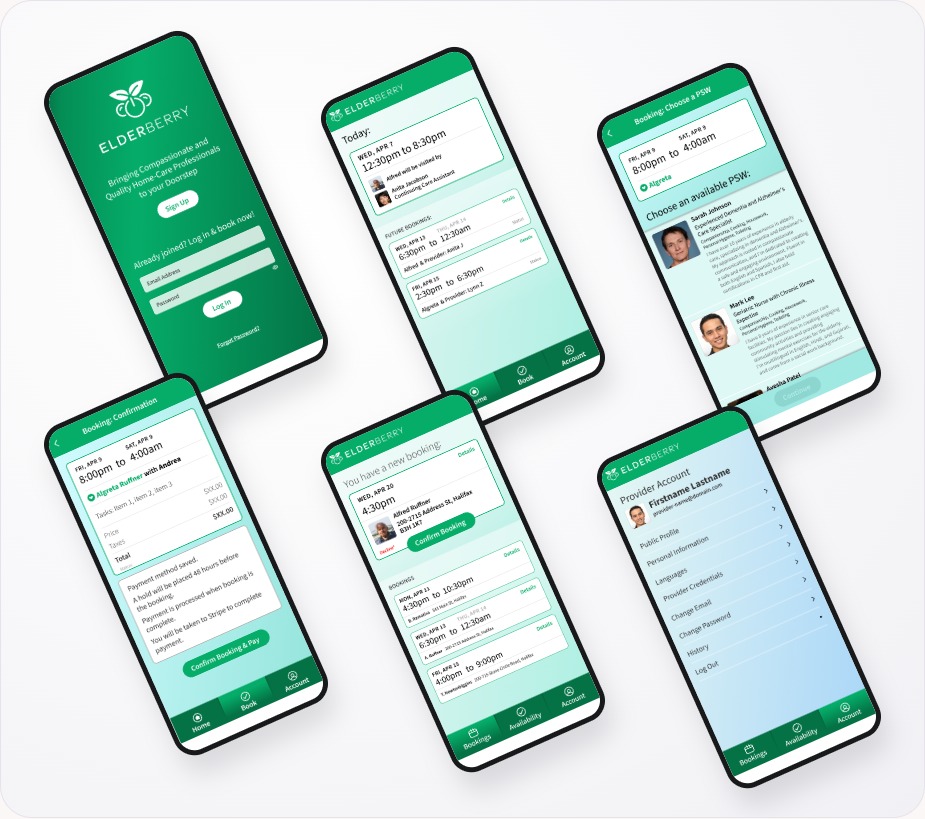
The supplied design screens show today’s care visit, upcoming bookings, care-receiver profiles and a choice of available personal support workers. Booking details bring together the visit window, tasks, provider and cost summary before confirmation. History and separate provider/platform feedback complete the customer journey.
For care professionals
Providers see new requests, confirm or decline a booking, review visit details and follow bookings in progress. Account options cover profile information, languages and credentials. After a visit, the follow-up flow separates facilitator notes from feedback for Elderberry.
What these screens document
These are supplied product design mockups, including placeholder content and example identities. They illustrate the intended workflows rather than live care records or proof that every depicted feature shipped. The confirmation design shows a payment hand-off; it does not establish the production payment implementation.
Inside the app.
Select a screen for a closer look ↗